
Part 2: Preparing an AI agent to port software to the PDP-11
I made some initial efforts at getting pine working on 2.11BSD running on an emulated PDP-11. I was successful with pine's editor, pico. However, pine required a lot more slimming down before it could run on the PDP-11.
I turned to an AI agent because while I didn't mind guiding AI through the work, there was no way I would maintain enough interest in this project to finish it by hand.
Portability
Portability isn't that unusual these days. Plenty of code runs on multiple platforms without much fuss thanks to frameworks built with that goal in mind. What is unusual is running something written decades ago. If you wrote an app today, would it still compile and run in 2056?
Pine is an example of what portability looks like: a C program, designed over three decades ago to run on many different platforms, Linux and BSD included. That made using an AI agent practical, as the experimental development and testing work could happen quickly on x86 Linux, leaving only the smaller portion of running and verifying the result on the PDP-11.
That's not to say it needed no changes to get working on modern Linux. I had to fix some build assumptions and do some other cleanup:9 commits, 68 files changed, 2194 insertions(+), 14616 deletions(-)
After that point, I could put AI to work cutting out features and reducing the size of pine:257 commits, 334 files changed, 23272 insertions(+), 76859 deletions(-)
I wanted an efficient way to run the developer build/test cycle on the PDP-11 itself. Running an AI client on the PDP-11 is completely out of the question, so I needed tools for the agent to control the PDP-11.
The constraint: no network, one serial line in
I dedicated one (emulated) serial line on the PDP-11 to this. I don't have emulated networking set up on my PDP-11 on purpose (the UUCP-only premise from Part 1 of this series), so telnet, ftp, and rsh are not an option.
The tools need to log in to the serial line and then they have access to a Unix shell where they can run commands. File transfer can happen via zmodem, which is a file transfer protocol designed in the BBS days to transfer files over serial ports and modems.
Why are these tools useful
AI agents are currently designed to run command line tools locally instead of dealing with interactive shell sessions. They can get by with things like taking a (text) screenshot with tmux and then injecting keypresses into a terminal, but that is slow and token inefficient: re-reading the whole terminal screen on every step costs real time and money. Having a tool for each action (download file, upload file, run compile, ...) fits better into the agent model.
The developer build/test cycle tools
The AI edits files locally and needs a way to get them on the remote system. So my first goal was around file synchronization.
Uploading files is slow at 9600 baud, which is the limit of the PDP-11 serial hardware. The average source file in this version of pine is 17KB, which is 17 seconds per upload (after the 120 byte/s bug was fixed in the emulator). So I kept a local cache of the remote files and had diff build a patch to apply remotely. Since the cache can get out of sync, I added a checksum verification before trusting the cache as well as one after the patch is applied. If either checksum fails, the tool falls back to using zmodem on the whole file.
The repo for these tools is on github
2.11BSD's checksum tool is limited
The only checksum tool 2.11BSD has is the 16-bit rotate-add program "sum". I wanted to make it more likely to catch sync errors, so I switched to a CRC-32 (like the one used in gzip/zip/PNG/Ethernet). I wrote a simple tool that compiles on 2.11BSD for it.
Tool design
These tools use Python's expect library (pexpect) to control the remote system. When transferring files, they use lrzsz's sz (send zmodem) and rz (receive zmodem). To connect zmodem to the emulator, they use socat between the emulator's TCP port and a pseudo-tty.
The tcsh prompt
The problem that tools like expect and ansible need to solve is keeping track of the state of the remote system, and noticing when the last command finished and the shell is waiting for input.
Tcsh has a way to run a command before it prints out the prompt with "precmd". I'm using that to echo both the exit status of the previous command and a UUID to make the string unique and easy to match. Expect sends one command at a time and waits for the exit code and UUID.
An example usage
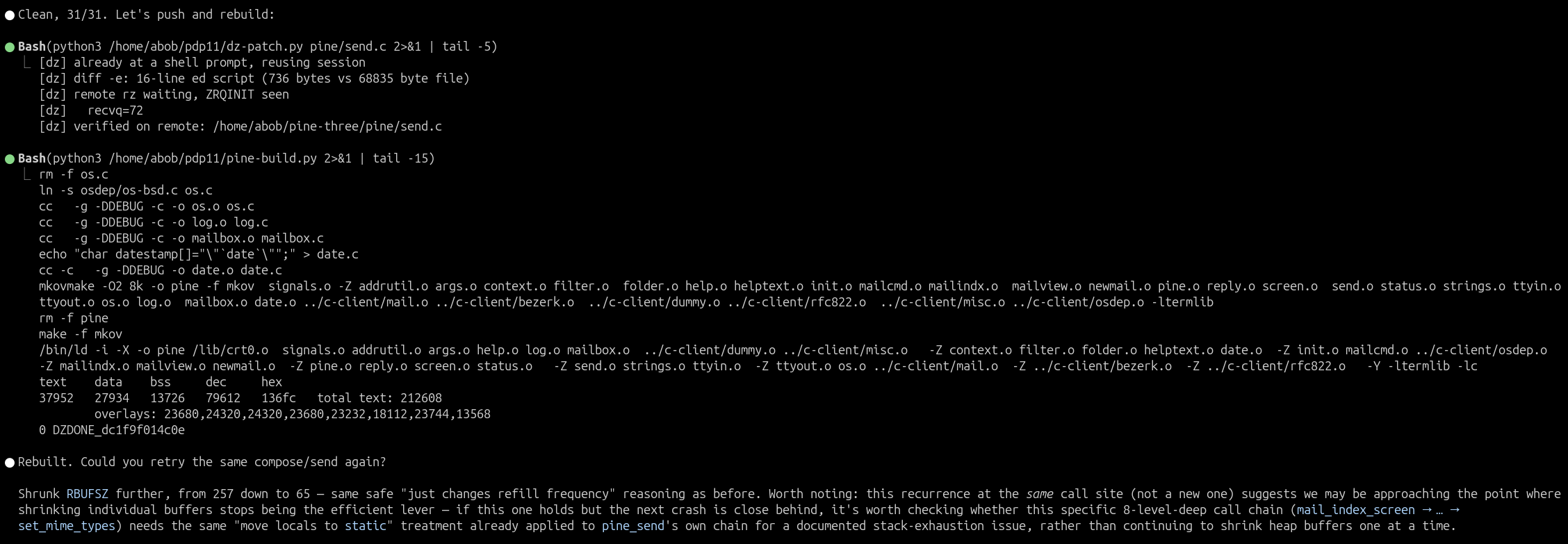
Now that the tools are built, here it is in use. Claude Code was able to autonomously send a file edit over to the PDP-11 with dz-patch (736 bytes sent instead of the whole 68,835 byte file, a 99% reduction), rebuild pine with pine-build, and explain the changes it made. What's left to do is cut down pine's features to fit into a tiny memory space.
Questions? Comments? Contact information