
Charging an EV using Solar
I recently got an EV and wanted to setup a way to charge it using the excess solar power that my house generates. It should charge faster when there is excess power and it should suspend charging when the house is importing from the grid. I should also be able to manually override it and tell it to charge as fast as possible.
Supplies
For the hardware, I have an Autel MaxiCharger AC Elite (50A 240V, ~12kw), a Ford Mach-E (70kwh battery, ~10kw level 2 charge rate), and an Enphase-based Solar array.
For the software, I explored evcc, which I think worked but I didn't want to either pay $150 or have to regenerate a limited time token every 2 weeks. Instead, I used Home Assistant which also brings the ability to tie in data from other sources, and build nice dashboards.
Configuration
I added HACS to Home Assistant, which gave me access to the Open Charge Point Protocol (OCPP) plugin as well as the FordPass plugin.
Starting with the OCPP plugin, you setup a "central" entry with some minimal configuration:
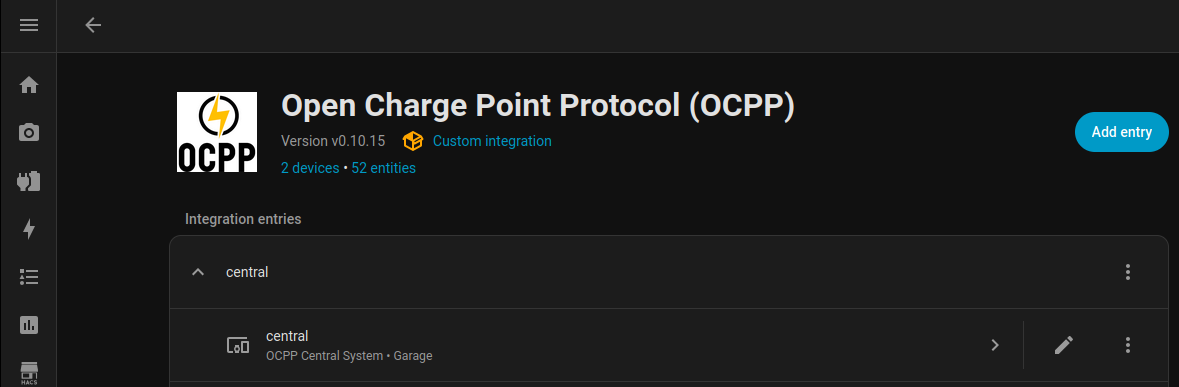
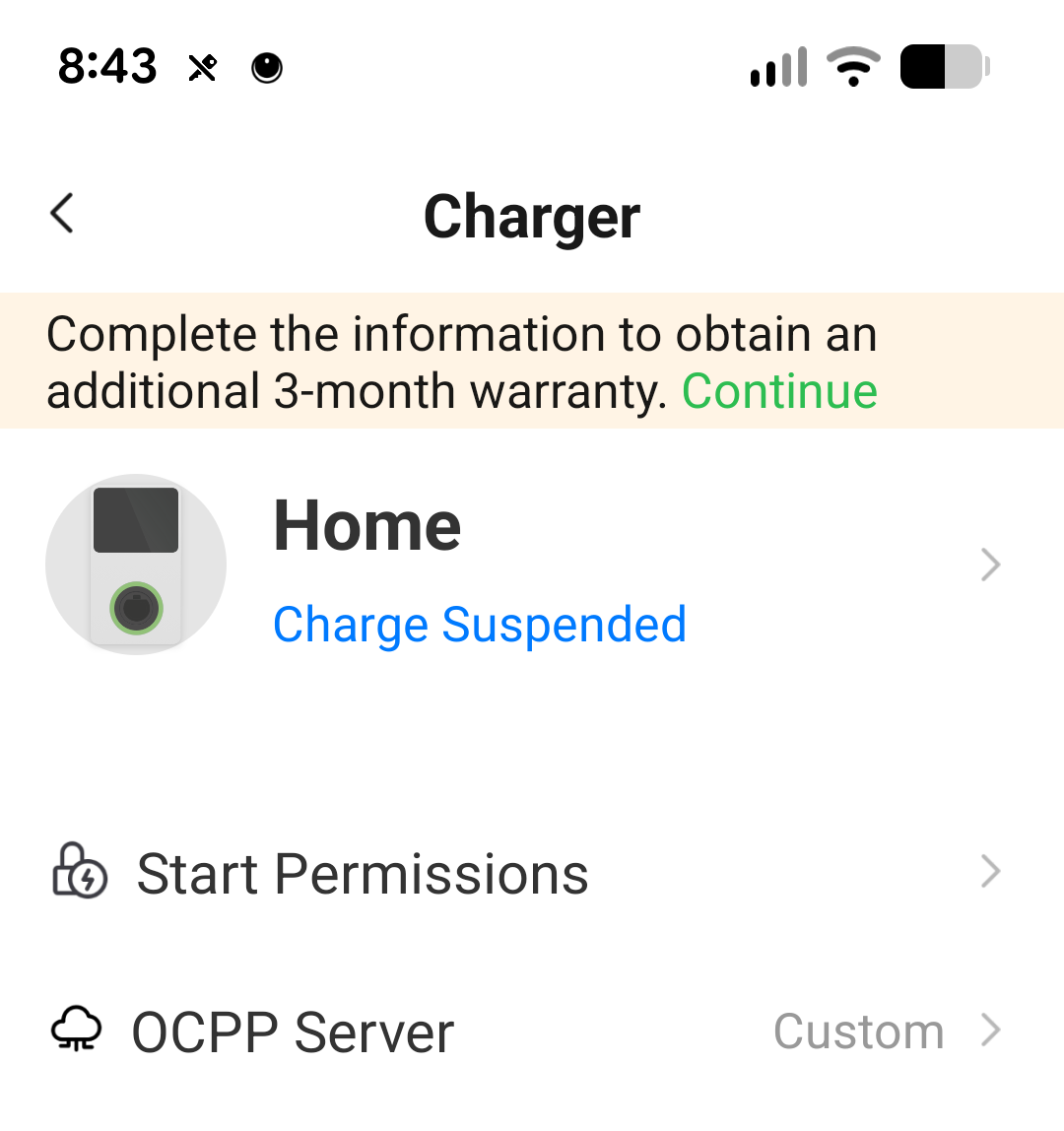
Configuring the Autel to use the Home Assistant's OCPP requires I connect to it via bluetooth with the phone app. Also, switching to your own OCPP server breaks the Autel app unless you're connected via bluetooth. If you want their app back, you can switch back to the "Autel Cloud" OCPP server.
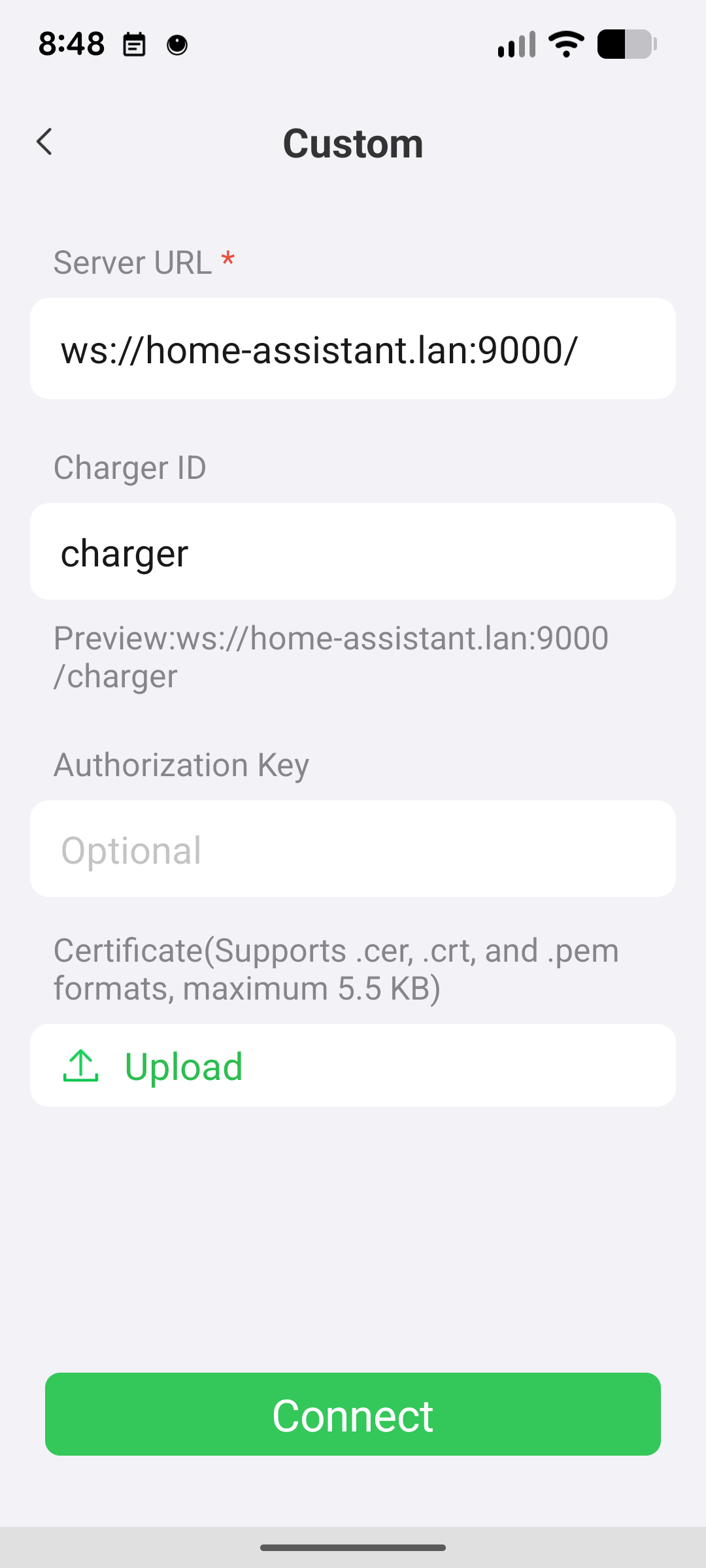
For the ws:// protocol, you don't need a certificate. The "Charger ID" is whatever you want to name it. Once you've connected the charger to HA's OCPP, it should show up as a device:
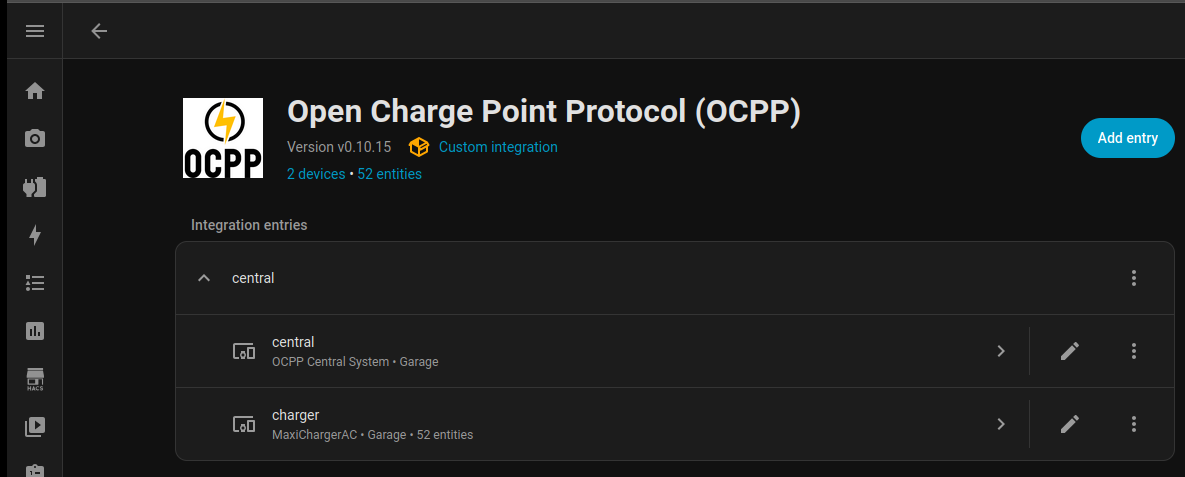
The documentation for the HA OCPP plugin mentions a warning: be careful about what value you're changing when setting the charge rate, if it's a persistent setting it will get written to flash which has a limited number of write cycles. This could lead to bricking your EVSE quicker than you might expect. Instead, change the value on the current active charger transaction, which shouldn't require a write to flash.
Next, configure your solar and car data. The documentation for these are good, so I'll skip going into detail on how to set them up.
Dashboard: Energy
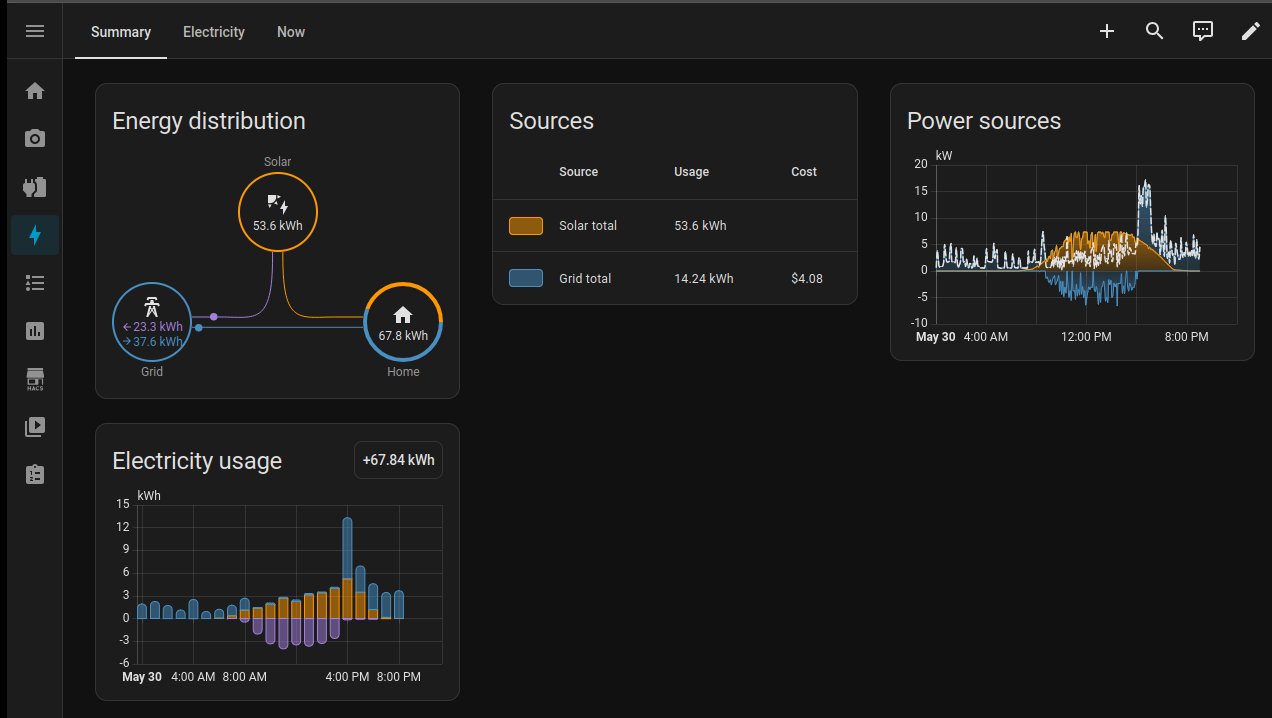
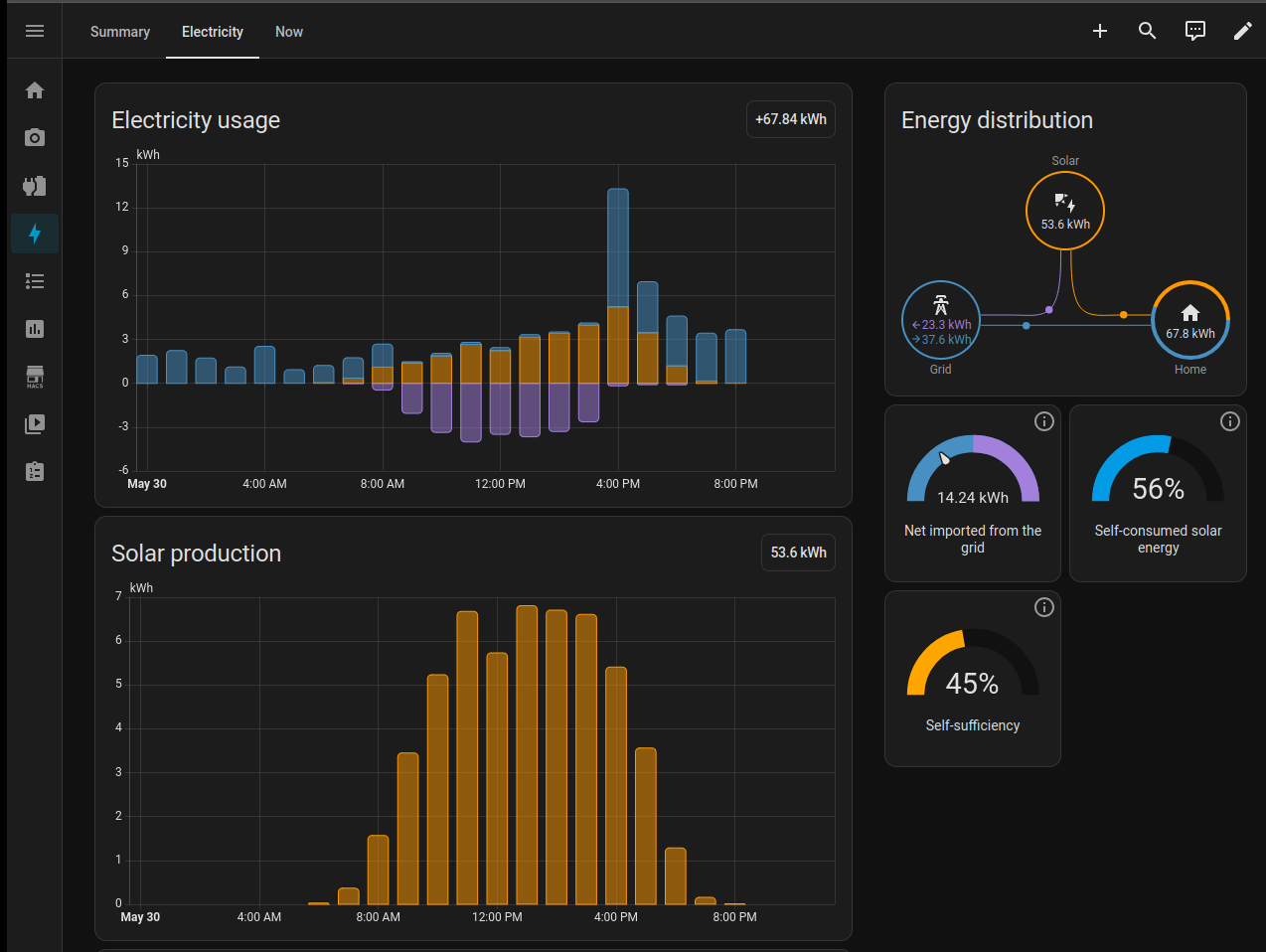
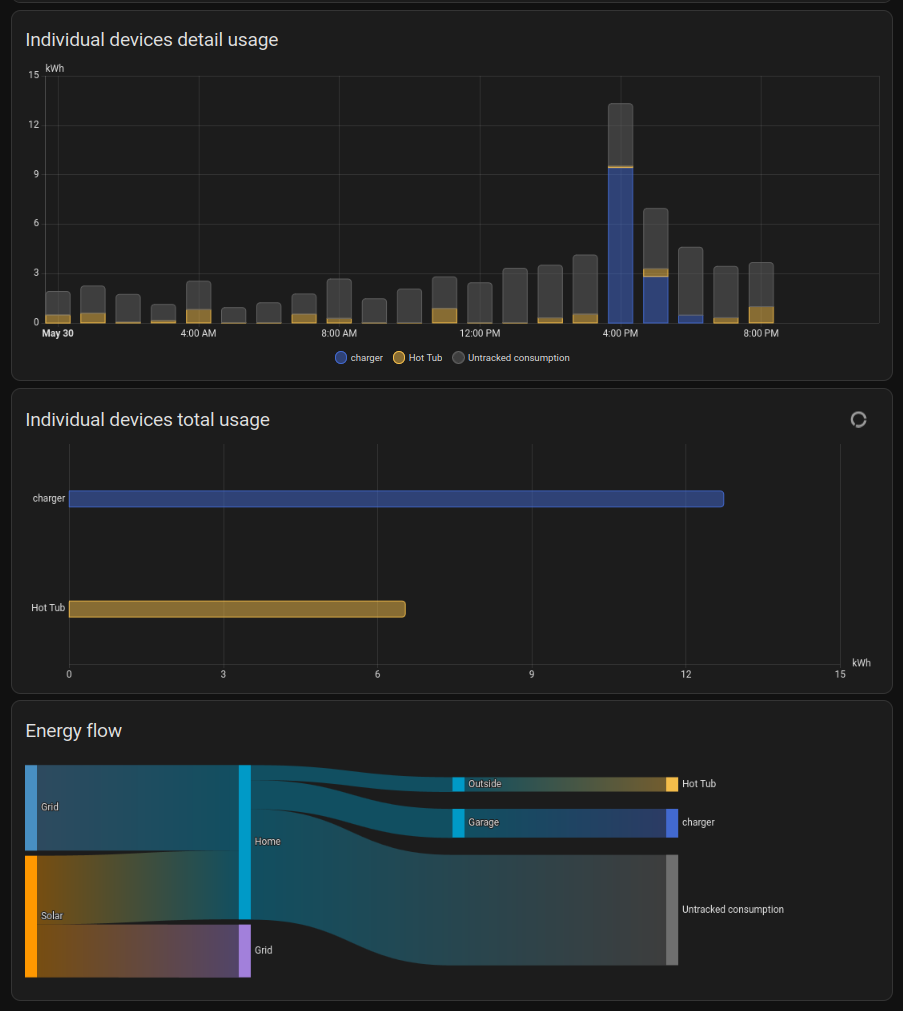
The built-in energy dashboard for Home Assistant is pretty cool, and has a bunch of great data:
Dashboard: Charger
But I also made my own dashboard of the relevant data:
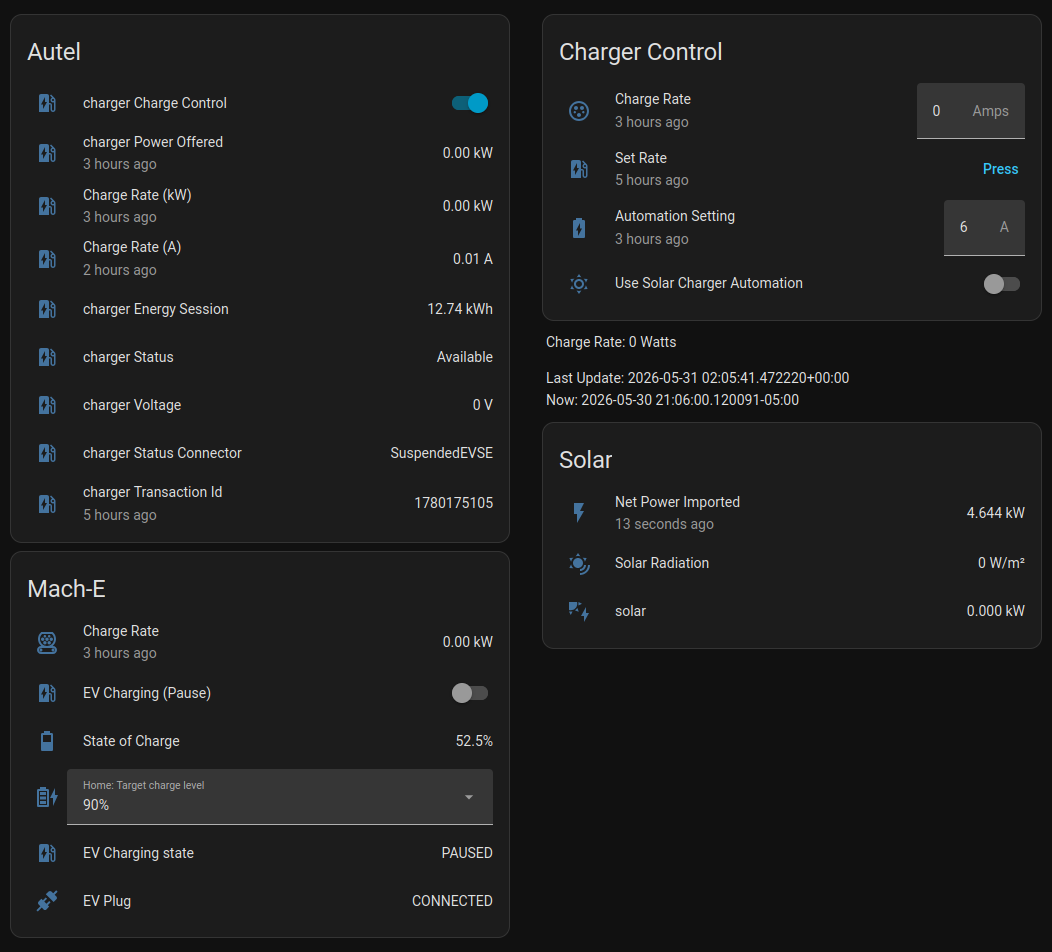
The "Charger Control" section provides a way to change the speed of the charger, as well as a way to turn on the solar charger automation.
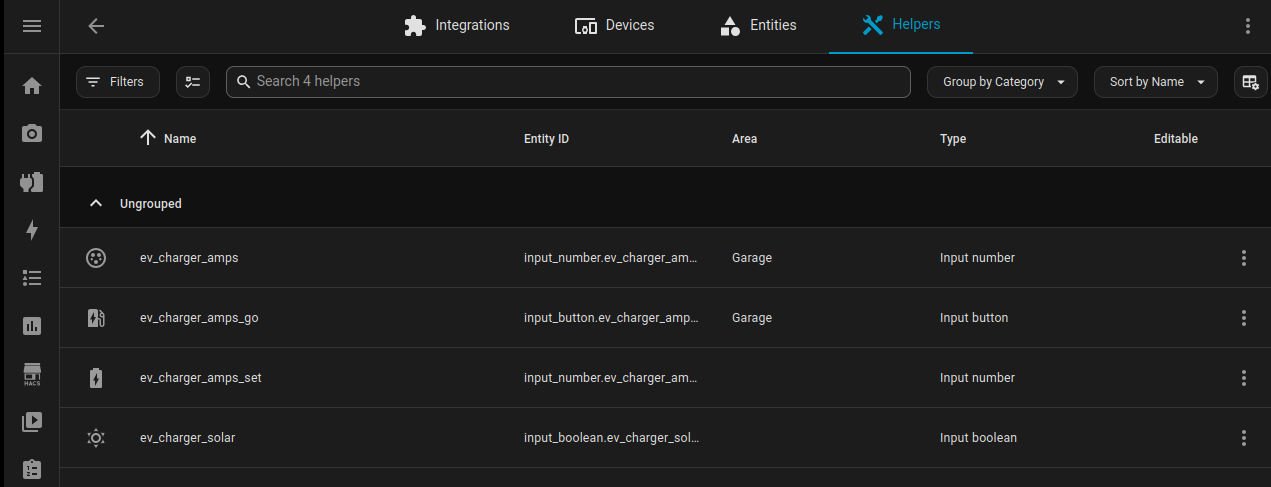
The "Charge Rate", "Set Rate", "Automation Setting", and "Use Solar Charger Automation" are all HA "helpers", which provide inputs:
Automation: manual set
The Set Rate button (ev_charger_amps_go) triggers this automation:
alias: Manual Set Charger
description: ""
triggers:
  - trigger: state
    entity_id:
      - input_button.ev_charger_amps_go
conditions:
  - condition: device
    type: is_on
    device_id: ad1a433e39bcebccb12910f27a78d79a
    entity_id: 3ec7dfadb4203d450627024c805bae4a
    domain: switch
actions:
  - action: ocpp.set_charge_rate
    metadata: {}
    data:
      custom_profile:
        transactionId: "{{ states('sensor.charger_transaction_id') | int }}"
        chargingProfileId: 3001
        stackLevel: 19
        chargingProfilePurpose: TxProfile
        chargingProfileKind: Absolute
        chargingSchedule:
          startSchedule: "2026-04-17T16:01:45.000Z"
          chargingRateUnit: A
          chargingSchedulePeriod:
            - startPeriod: 0
              limit: "{{ states('input_number.ev_charger_amps') | int }}"
      conn_id: 1
mode: single
This uses the "Charge Rate" (ev_charger_amps) input to manually set the charger. The Autel does not accept Relative changes, so all my automation uses Absolute settings. It accepts both watts (W) and amps (A) for units, and I'm using amps. I have the default setting to be full power (50A) or otherwise it will refuse to go above that limit. The start schedule time is a random date in the past, which the EVSE requires but doesn't seem to mind. The condition is testing if the EVSE "charger Charge Control" is on.
I'm using ocpp.set_charge_rate to set the value on the charge transaction rather than the default charge setting in the hopes that will avoid wearing out the flash in my EVSE. Also, multiple pieces of OCPP software have 32A hard-coded as the maximum possible charge rate. Using set_charge_rate gets around that limitation.
Automation: Calculate Charge Rate
Next up, an automation to calculate how many amps should the charger supply based on the net grid import/export:
alias: Solar to Charger
description: ""
triggers:
  - trigger: state
    entity_id:
      - sensor.envoy_1234_current_net_power_consumption
conditions: []
actions:
  - action: input_number.set_value
    metadata: {}
    target:
      entity_id: input_number.ev_charger_amps_set
    data:
      value: >
        {% set amps = min(31, int(int(states('input_number.ev_charger_amps')) -
        float(states('sensor.envoy_482518015855_current_net_power_consumption'))
        * 1000 / 240)) %} {% if amps <= 6 %}
          6
        {% else %}
          {{ amps }}
        {% endif %}
mode: single
Every time the Enphase system is polled for the current net power consumption (~1 minute), this automation converts the net kw into net amps (at 240V), and subtracts that from the current amps. It clamps the max to 31A and minimum to 6A. Below 6A, the EVSE suspends the charger session. Above 31A is more than my solar panels can produce. This value is stored in "Automation Setting" (ev_charger_amps_set).
This is a proportional controller, when the net power is flowing to the grid, the charger setting is raised and when the power is flowing from the grid, the charger setting is lowered. If there were multiple systems tracking the net grid power (for example: a home battery or a second EVSE), there would be a risk of oscillation between the two flipping between overshooting and undershooting net-0 wattage. But that doesn't apply in my case currently.
Home assistant polls the Enphase solar every minute for the net grid usage, which gives the system plenty of time to settle between making a change and observing the result. This also means that the system is slow to respond to changes in power usage (for example, the AC turning on). I'm ok with it taking a minute to respond.
Automation: Apply Charge Rate
There's another automation that watches changes to this value and sets the current transaction's amp limit if "Use Solar Charger Automation" is turned on:
alias: Automated Set Charger
description: Automated Solar Car Charging
triggers:
  - trigger: state
    entity_id:
      - input_number.ev_charger_amps_set
conditions:
  - condition: state
    entity_id: input_boolean.ev_charger_solar
    state:
      - "on"
  - condition: device
    type: is_on
    device_id: ad1a433e39bcebccb12910f27a78d79a
    entity_id: 3ec7dfadb4203d450627024c805bae4a
    domain: switch
actions:
  - action: ocpp.set_charge_rate
    metadata: {}
    data:
      custom_profile:
        transactionId: "{{ states('sensor.charger_transaction_id') | int }}"
        chargingProfileId: 3001
        stackLevel: 19
        chargingProfilePurpose: TxProfile
        chargingProfileKind: Absolute
        chargingSchedule:
          startSchedule: "2026-04-17T16:01:45.000Z"
          chargingRateUnit: A
          chargingSchedulePeriod:
            - startPeriod: 0
              limit: "{{ states('input_number.ev_charger_amps_set') | int }}"
      conn_id: 1
  - action: input_number.set_value
    metadata: {}
    target:
      entity_id: input_number.ev_charger_amps
    data:
      value: "{{ states('input_number.ev_charger_amps_set') | int }}"
mode: single
This also updates "Charge Rate" (ev_charger_amps) as an input to the next run of "Solar to Charger" automation.
Two more cases I automated: when to turn the EVSE on and when to turn it off. If the EVSE turns on and off too quickly, the car considers it faulty and will refuse to charge any more. So I give it extra time before turning it off to limit how often the EVSE cycles on and off.
Automation: power on
alias: Turn on charger
description: ""
triggers:
  - trigger: numeric_state
    entity_id:
      - sensor.envoy_482518015855_current_net_power_consumption
    for:
      hours: 0
      minutes: 3
      seconds: 0
    below: -0.4
conditions:
  - condition: state
    entity_id: input_boolean.ev_charger_solar
    state:
      - "off"
  - condition: device
    type: is_on
    device_id: ad1a433e39bcebccb12910f27a78d79a
    entity_id: 3ec7dfadb4203d450627024c805bae4a
    domain: switch
actions:
  - action: input_boolean.turn_on
    metadata: {}
    target:
      entity_id: input_boolean.ev_charger_solar
    data: {}
  - action: ocpp.set_charge_rate
    metadata: {}
    data:
      custom_profile:
        transactionId: "{{ states('sensor.charger_transaction_id') | int }}"
        chargingProfileId: 3001
        stackLevel: 19
        chargingProfilePurpose: TxProfile
        chargingProfileKind: Absolute
        chargingSchedule:
          startSchedule: "2026-04-17T16:01:45.000Z"
          chargingRateUnit: A
          chargingSchedulePeriod:
            - startPeriod: 0
              limit: 6
      conn_id: 1
  - action: input_number.set_value
    metadata: {}
    target:
      entity_id: input_number.ev_charger_amps
    data:
      value: 6
mode: single
This looks to see if the net grid is 400W export over 3 minutes, the "Automation Setting" is off, and the "Charge Control" is on. If everything matches, it turns on the "Automation Setting", sets the charge rate to 6A, and updates the "Charge Rate" to match that.
While the minimum charge rate is ~1.4kw, I chose 400W as the cutoff because I would rather consume 1kw from the grid compared to exporting 400W.
Automation: power off
alias: Turn off charger
description: ""
triggers:
  - trigger: numeric_state
    entity_id:
      - sensor.envoy_482518015855_current_net_power_consumption
    for:
      hours: 0
      minutes: 10
      seconds: 0
    above: 1.6
conditions:
  - condition: state
    entity_id: input_boolean.ev_charger_solar
    state:
      - "on"
  - condition: device
    type: is_on
    device_id: ad1a433e39bcebccb12910f27a78d79a
    entity_id: 3ec7dfadb4203d450627024c805bae4a
    domain: switch
  - condition: numeric_state
    entity_id: input_number.ev_charger_amps
    below: 8
actions:
  - action: input_boolean.turn_off
    metadata: {}
    target:
      entity_id: input_boolean.ev_charger_solar
    data: {}
  - action: ocpp.set_charge_rate
    metadata: {}
    data:
      custom_profile:
        transactionId: "{{ states('sensor.charger_transaction_id') | int }}"
        chargingProfileId: 3001
        stackLevel: 19
        chargingProfilePurpose: TxProfile
        chargingProfileKind: Absolute
        chargingSchedule:
          startSchedule: "2026-04-17T16:01:45.000Z"
          chargingRateUnit: A
          chargingSchedulePeriod:
            - startPeriod: 0
              limit: 0
      conn_id: 1
  - action: input_number.set_value
    metadata: {}
    target:
      entity_id: input_number.ev_charger_amps
    data:
      value: 0
mode: single
This looks to see if the net grid import is over 1.6kw for 10 minutes, that the "Automation Setting" is on, the "Charge Control" is on, and the "Charge Rate" is below 8A. If so, then it sets the "Charge Rate" to 0A and tells the EVSE to match that.
The 1.6kw trigger level for off is different than the 0.4kw trigger level for on due to hysteresis. In other words, I want to avoid the system cycling between on and off as much as possible so it'll stay on at the expense of importing more energy. I usually charge my car around 300kwh/month, or about $45 if all that energy came from the grid, so that's the worst case cost if there's no excess solar power available.
Automation: start solar charging
alias: Automatically Charge
description: ""
triggers:
  - trigger: state
    entity_id:
      - sensor.envoy_482518015855_current_net_power_consumption
conditions:
  - condition: state
    entity_id: switch.charger_charge_control
    state:
      - "off"
  - condition: state
    entity_id: sensor.charger_status_connector
    state:
      - Preparing
  - condition: numeric_state
    entity_id: sensor.envoy_482518015855_current_net_power_consumption
    below: -0.5
actions:
  - action: switch.turn_on
    metadata: {}
    target:
      entity_id: switch.charger_charge_control
    data: {}
  - action: input_boolean.turn_on
    metadata: {}
    target:
      entity_id: input_boolean.ev_charger_solar
    data: {}
  - action: input_number.set_value
    metadata: {}
    target:
      entity_id: input_number.ev_charger_amps
    data:
      value: 6
mode: single
On every poll of the Enphase solar power usage, this checks to see if the charge control is off, the EV is plugged in and waiting, and the net power is exporting 0.5kw. If it is, it'll tell the EVSE to start a charging session, turn on automated solar control, and set the initial charging speed to 6A. But it has to wait for the charging session to start before sending the charging speed to the EVSE.
Automation: set first charge rate
alias: Set first charge rate
description: ""
triggers:
  - trigger: numeric_state
    entity_id:
      - sensor.charger_transaction_id
    above: 1
  - trigger: state
    entity_id:
      - sensor.charger_status_connector
    to:
      - Charging
conditions:
  - condition: state
    entity_id: input_boolean.ev_charger_solar
    state:
      - "on"
actions:
  - action: input_button.press
    metadata: {}
    target:
      entity_id: input_button.ev_charger_amps_go
    data: {}
mode: single
This waits for the charging session to start, verifies the solar charger automation is on, and then applies the initial charging speed to the session. This is so the charger doesn't start at a 50A charging session that the other automations will need to immediately turn off.
Dashboard: power usage
I also used an ESP32 (Crowpanel 3.5") + esphome to make a physical dashboard on my desk:
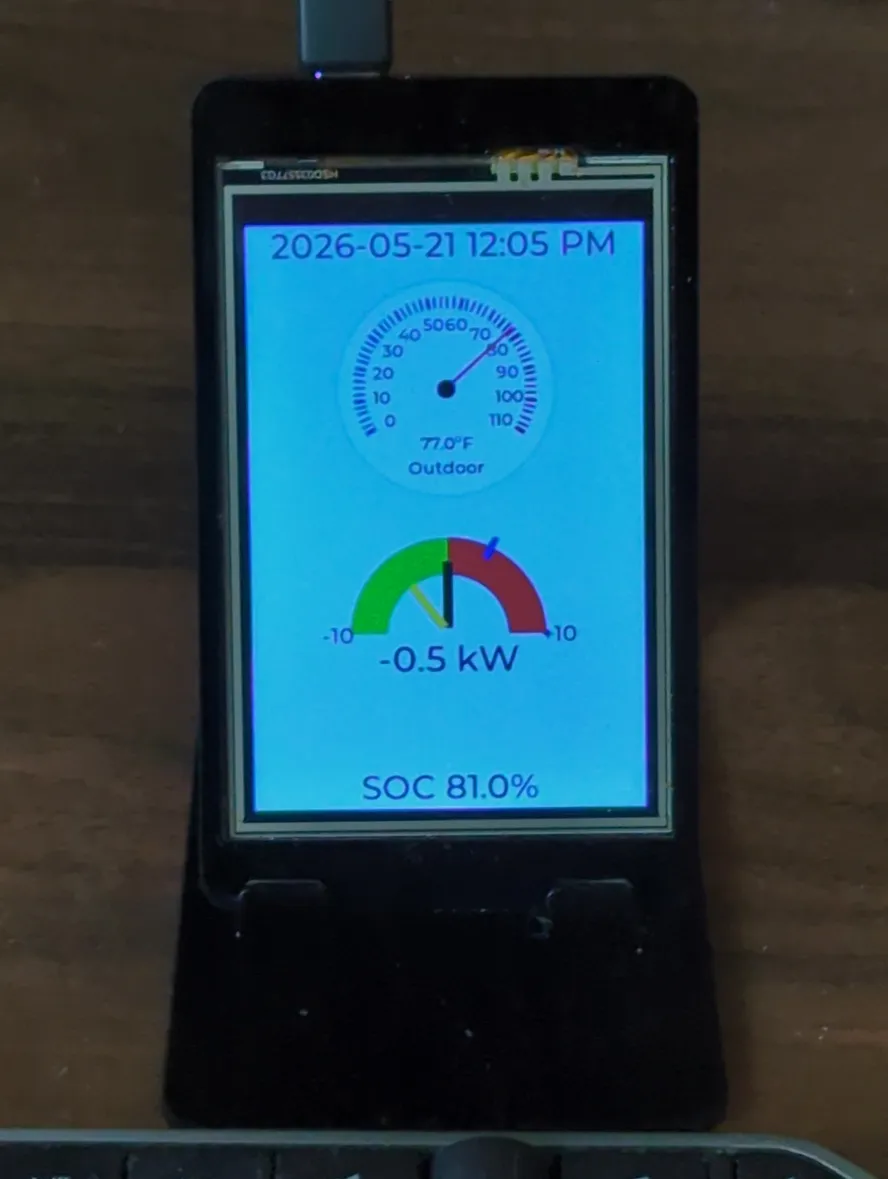
The green + red graph in the center shows power usage. The yellow is the solar generation, the black is the net grid import/export, and the blue is the car charger. The "SOC" at the bottom is the car's state of charge. Source: esphome yaml
Full speed charging
Full speed charging is the default if I trigger charging manually.
Having all this data in one system leads to a useful automation, like this one to full speed charge to 50% battery, and then switch to solar power charge:
alias: Turn on solar control when over 50%
description: ""
triggers:
  - trigger: numeric_state
    entity_id:
      - sensor.fordpass_123vin_soc
    above: 50
conditions:
  - condition: state
    entity_id: input_boolean.ev_charger_solar
    state:
      - "off"
  - condition: state
    entity_id: switch.charger_charge_control
    state:
      - "on"
actions:
  - action: input_boolean.turn_on
    metadata: {}
    target:
      entity_id: input_boolean.ev_charger_solar
    data: {}
mode: single
Example: solar charging session
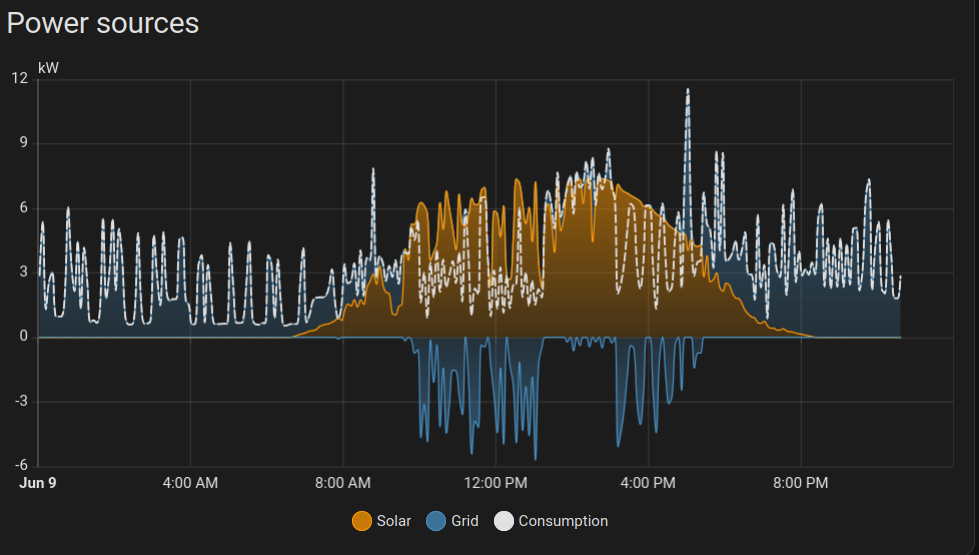
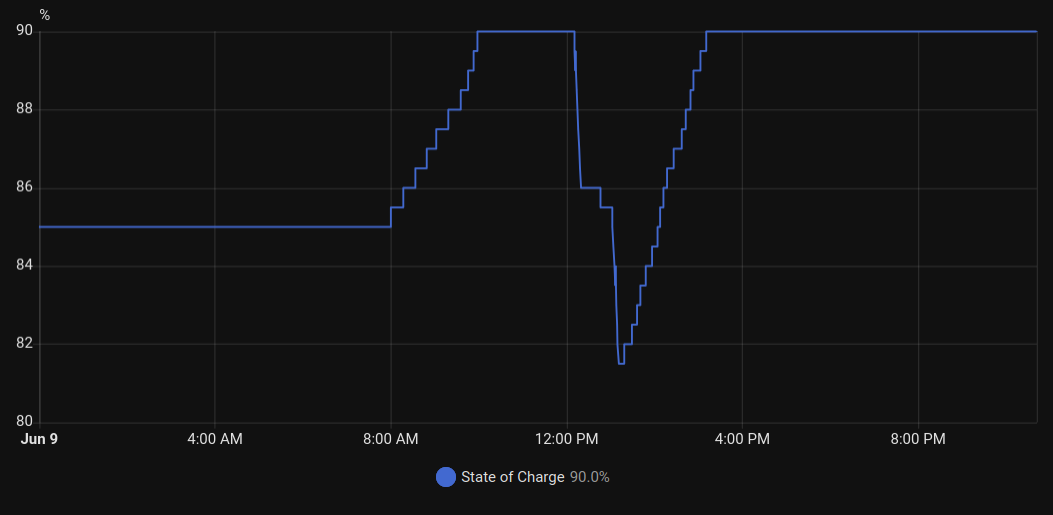
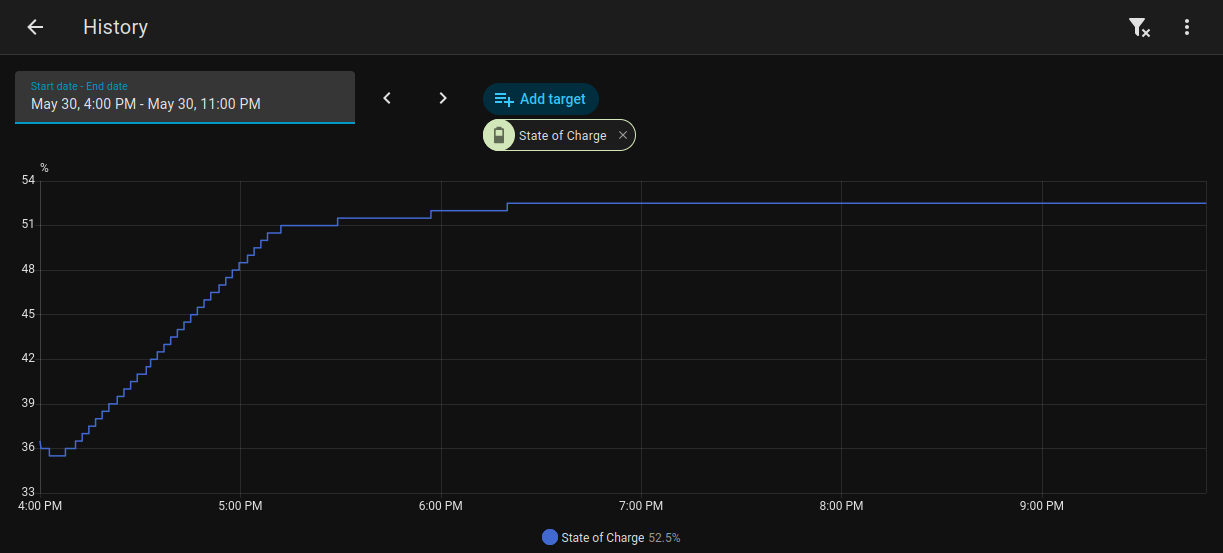
From the car battery graph, you can see it was charging between 8AM-10AM, when it hit my default 90% charge limit. The Solar/Grid graph shows there were no exports during that time and around 2.5kwh of imports. The EVSE delivered 3.6kwh of energy to the car and once charging stopped, solar started exporting to the grid. I went out for lunch which used 8.5% of my battery and when I got back the EVSE put another 6.2kwh into the car between 1PM-3PM. During the same time the house imported 1.7kwh from the grid.
Future Improvements
I have a few things to make easier:
I'd like a pair of buttons near the charger that I can use to specify if I want to full speed charge or charge as solar power is available. This could be another esphome ESP32.
Full speed charging has a race condition that could cause the solar charger automation to turn on and take over. To avoid that, the EVSE needs to get the net power imported high enough quickly enough that the "Turn on charger" automation doesn't run.
Questions? Comments? Contact information